When the design has to print
Same speed. Real output.
Canva is brilliant until the file goes to press. Popcorn designs at the same pace — templates, AI, browser, collaboration — and exports genuine press files: ICC CMYK, spot separations, dielines and PDF/X-4.
Free to start · Import PDF, SVG and PSD
The wall
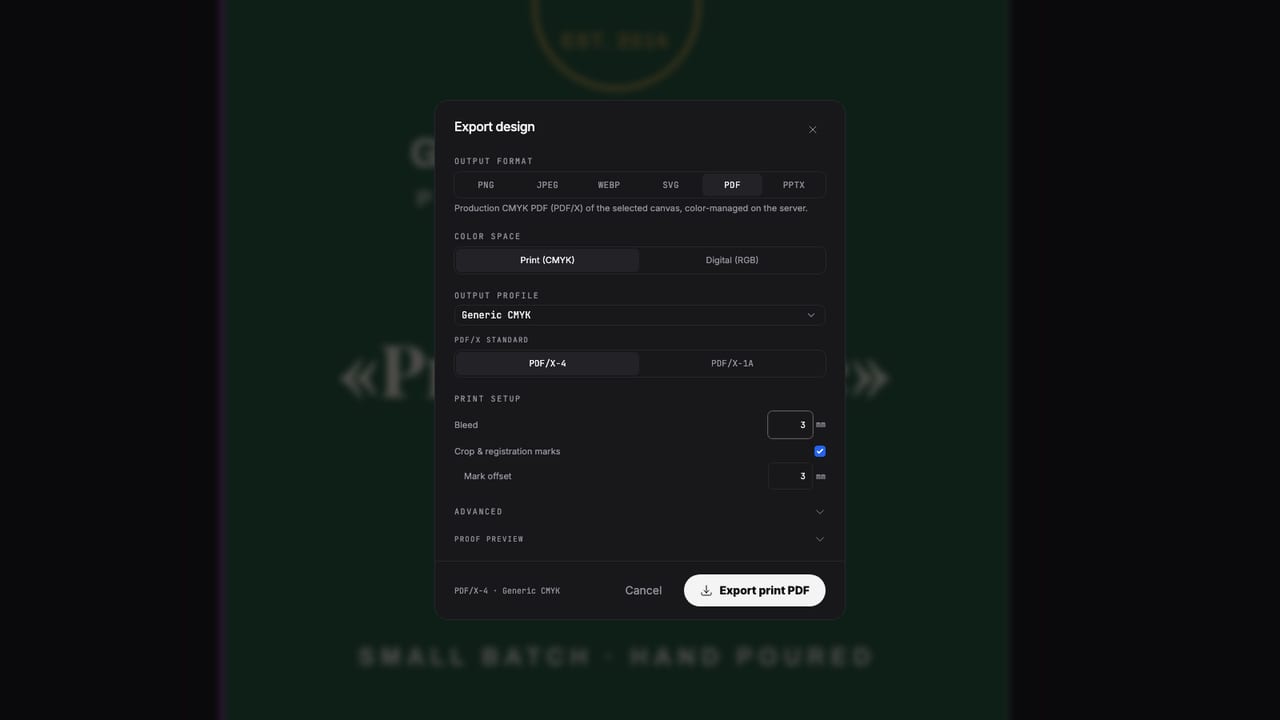
“Export as CMYK PDF” is not a prepress pipeline.
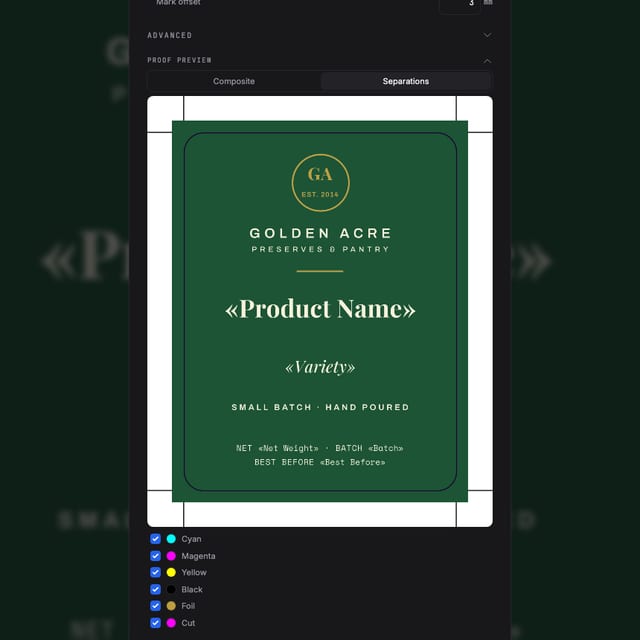
A checkbox conversion at export can't choose ICC profiles, keep spot inks, preview separations or run preflight. That's fine for the office printer — and exactly where press jobs get rejected. Popcorn does the design part the same way, and the production part properly.
Side by side
What arrives at the printer
| For print production | Popcorn Editor | Canva |
|---|---|---|
| Color model while you design | Real CMYK + spot swatches | RGB, converted at export |
| ICC profiles (SWOP / FOGRA39 / GRACoL) | Yes | — |
| Spot color separations & overprint | Per-plate preview before export | — |
| PDF/X-4 output | Yes | PDF with CMYK conversion |
| Dielines & cut contours | Generated as spot paths | — |
| Preflight checks | Low-res, spot loss, overprint | — |
| Imposition / step-and-repeat | Yes | — |
| Templates, AI generation, live collaboration | Yes | 1 |
Canva feature descriptions reflect its publicly documented export options; verify against your plan. Canva is a trademark of Canva Pty Ltd.
Made with Popcorn
Designed here, printed for real
Open any of these in the editor — same speed you're used to, with a press-ready file at the end.
 Cellar Index Drink List
Edit this template →
Cellar Index Drink List
Edit this template →
 Table Setting Placemat
Edit this template →
Table Setting Placemat
Edit this template →
 Daily Sheet Menu
Edit this template →
Daily Sheet Menu
Edit this template →
 House Monogram Napkin
Edit this template →
House Monogram Napkin
Edit this template →
 Field Report Data Almanac
Edit this template →
Field Report Data Almanac
Edit this template →
 Wayfinding Floor Sticker
Edit this template →
Wayfinding Floor Sticker
Edit this template →
 Farrow Editorial Numeral Label
Edit this template →
Farrow Editorial Numeral Label
Edit this template →
 Design Academy Prospectus
Edit this template →
Design Academy Prospectus
Edit this template →
No retraining
You already know how to use it
Start the way you do now
Templates for print formats, or a one-line AI prompt. Browser-based, shareable by link, live cursors for the team.
Bring your work along
Import PDF, SVG and PSD as editable objects — text, vectors and images, not flattened previews.
Export like a prepress pro
Preflight, separation preview, then a PDF/X-4 with bleed and crop marks. No “fingers crossed” step.
Questions
Switching questions, answered
Canva already has a "CMYK PDF" option. Isn't that enough?
Canva designs in RGB and converts at export — a conversion afterthought, not a prepress pipeline. There are no ICC profile choices, no spot colors, no separations preview, no overprint control and no preflight. For a poster from the office printer that's fine; for press work it's where files get rejected.
Is it as fast as Canva to actually design in?
Templates, AI generation from a prompt, and a modern browser editor with live collaboration — the working speed is the point. The difference shows up at export.
Can I bring designs over?
You can import PDF, SVG and PSD files, and rebuild quickly from templates or with AI. Text, images and vectors come in as editable objects.
What exactly do I get at export that Canva doesn't give me?
PDF/X-4 output through a real RIP with ICC profiles (SWOP, FOGRA39, GRACoL), spot color separations with overprint, dielines and cut contours, imposition, and preflight warnings before you send the file.
Do I have to pay to test it?
No — create a free account and export your first files. Pricing for paid plans is on the pricing page.
Start now
Canva can't send it to press. Popcorn can.
Free to start — no card, nothing to install.
Also looking at the full print pipeline, how it compares to InDesign ?